Cost Estimating Software

Every rate,
built from first principles.

TX1:Trinity is a Windows desktop estimating platform for construction and infrastructure. Each item is priced from the labour, plant, materials and subcontract that actually do the work — with embodied carbon carried on the same objects as the cost, and the whole database sitting on your own machine.
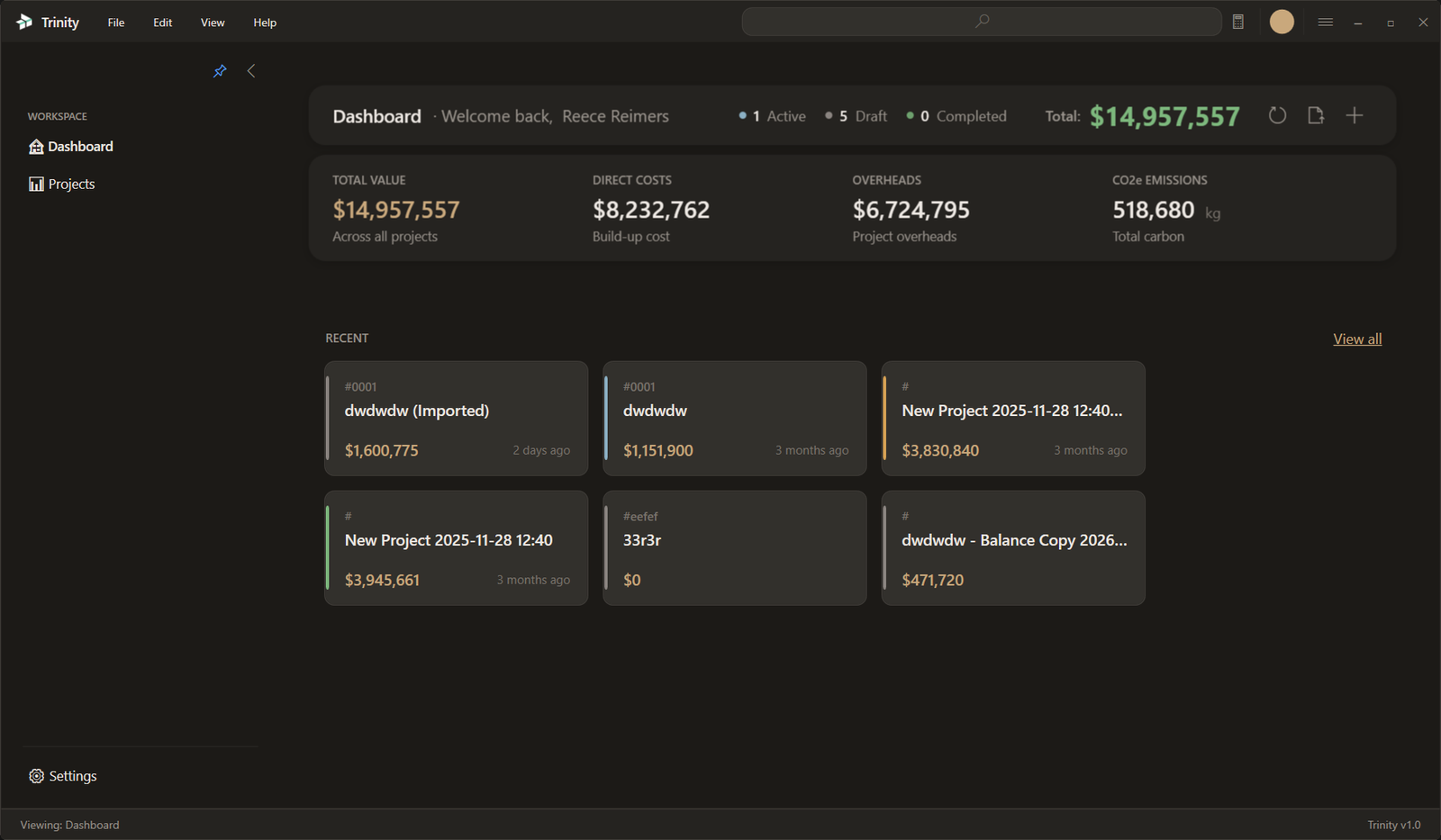
TX1:Trinity dashboard showing project KPIs, cost totals and recent projects

What the software actually does

Four mechanisms, each doing work a spreadsheet cannot do reliably at scale

Screenshot coming soon

Rates built from resources, not from memory

  • Labour, plant, material, subcontract, other and group resources, coded L. P. M. S. O. G.
  • Every code is shaped TYPE.FAMILY.SPEC[.MOD].PER.UNIT, so a catalogue stays sortable at thousands of rows
  • Built-up resources recompute as the sum of their contributing component rows
  • Change one component and the package rate, every item using it, and all allocations recompute with it
  • Factors stay explicit: EffectiveBaseRate = BaseRate × AppliedFactor
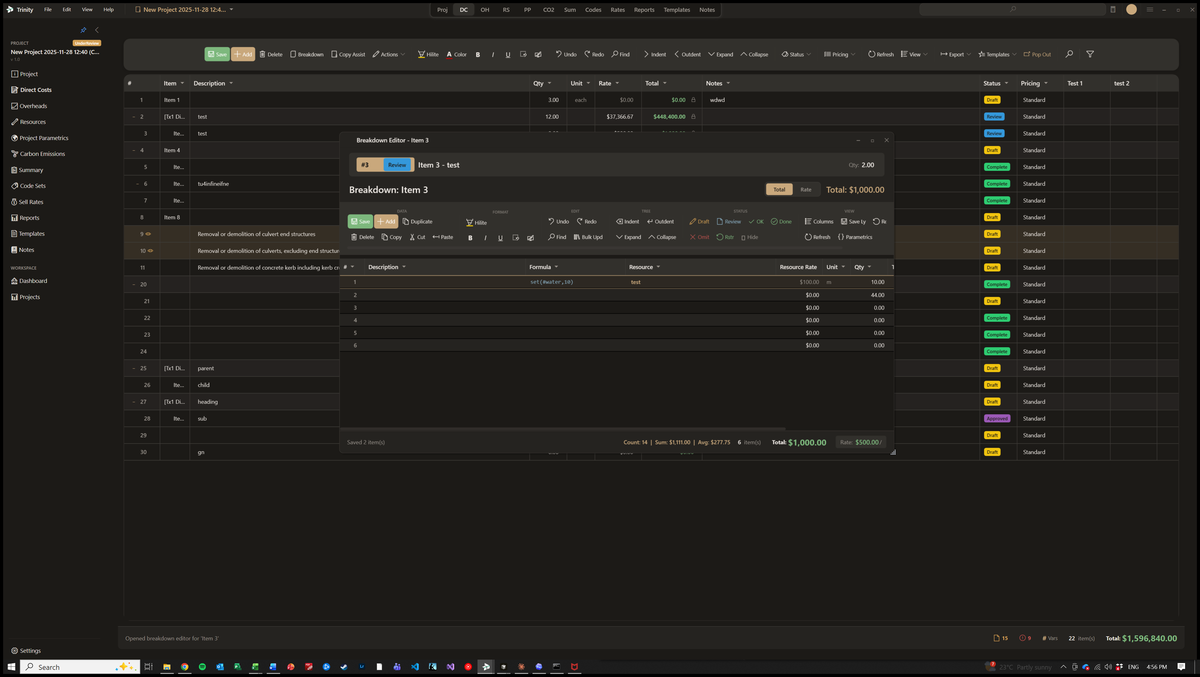
TX1:Trinity breakdown editor with a formula column, line references and resource rates

A real parametric formula engine

  • Shunting-Yard parser, an abstract syntax tree, and a dependency graph with cycle detection
  • 70+ functions, so the arithmetic stays in the estimate instead of migrating to a side spreadsheet
  • Project parametrics #name and scoped parametrics, declared once and used everywhere
  • Intermediate working with set(#VAR, expr) — the assumption is visible, not buried
  • Line references #lq<line>, #dc_total, and ranges such as SUM(L61:L62)
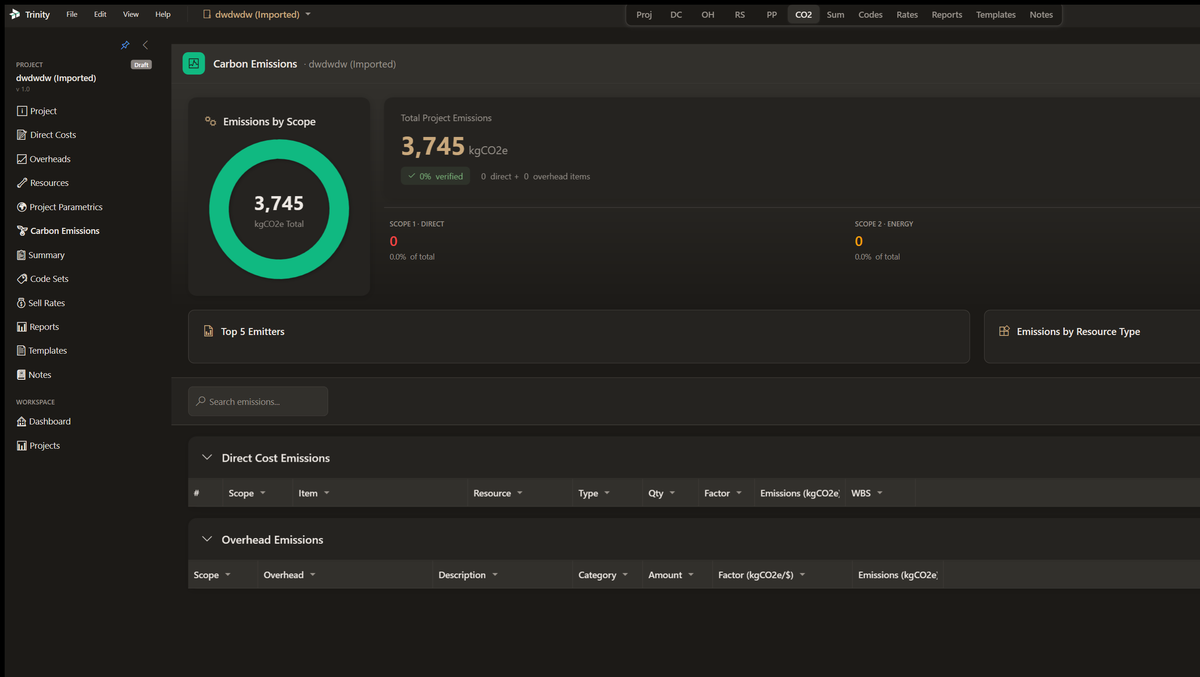
TX1:Trinity carbon emissions dashboard with Scope 1, 2 and 3 breakdowns and emission intensity metrics

Carbon on the same objects as cost

  • GHG Protocol Scope 1, 2 and 3 accounting attached to the resources and items you have already priced
  • Emission factors held against the resource, so a rate change and a carbon change are the same edit
  • Data-quality ratings from 1 to 5, recorded per factor rather than quietly assumed
  • A verification workflow and snapshots, so a submitted carbon position can be reproduced later
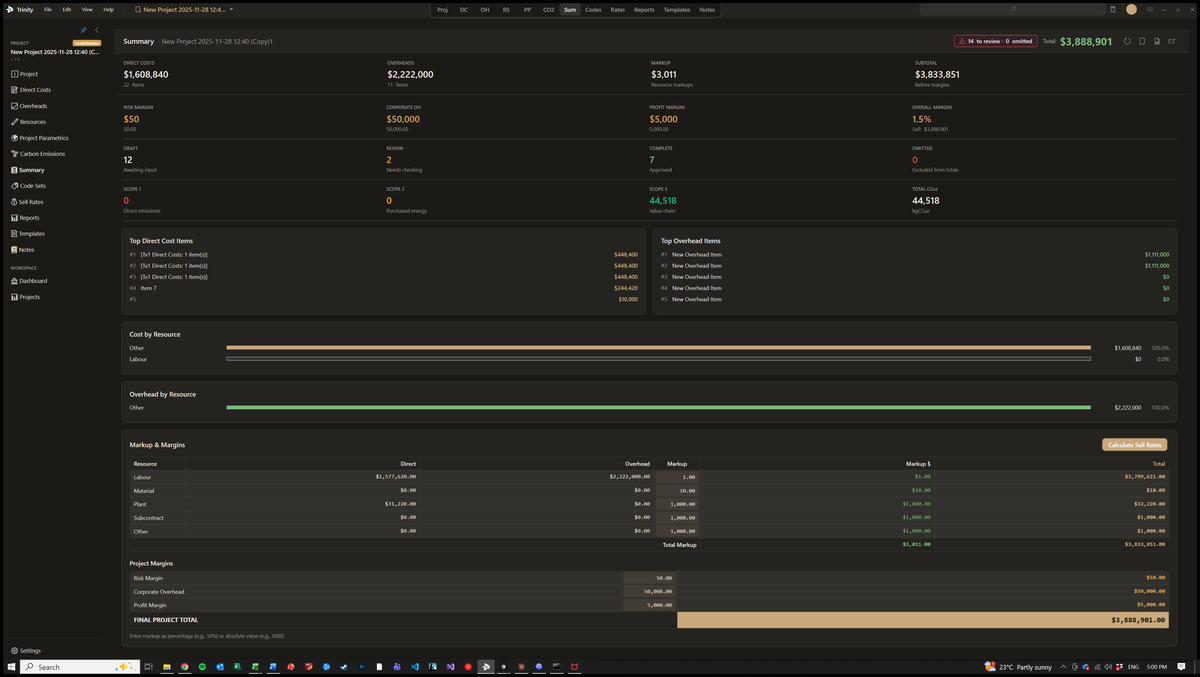
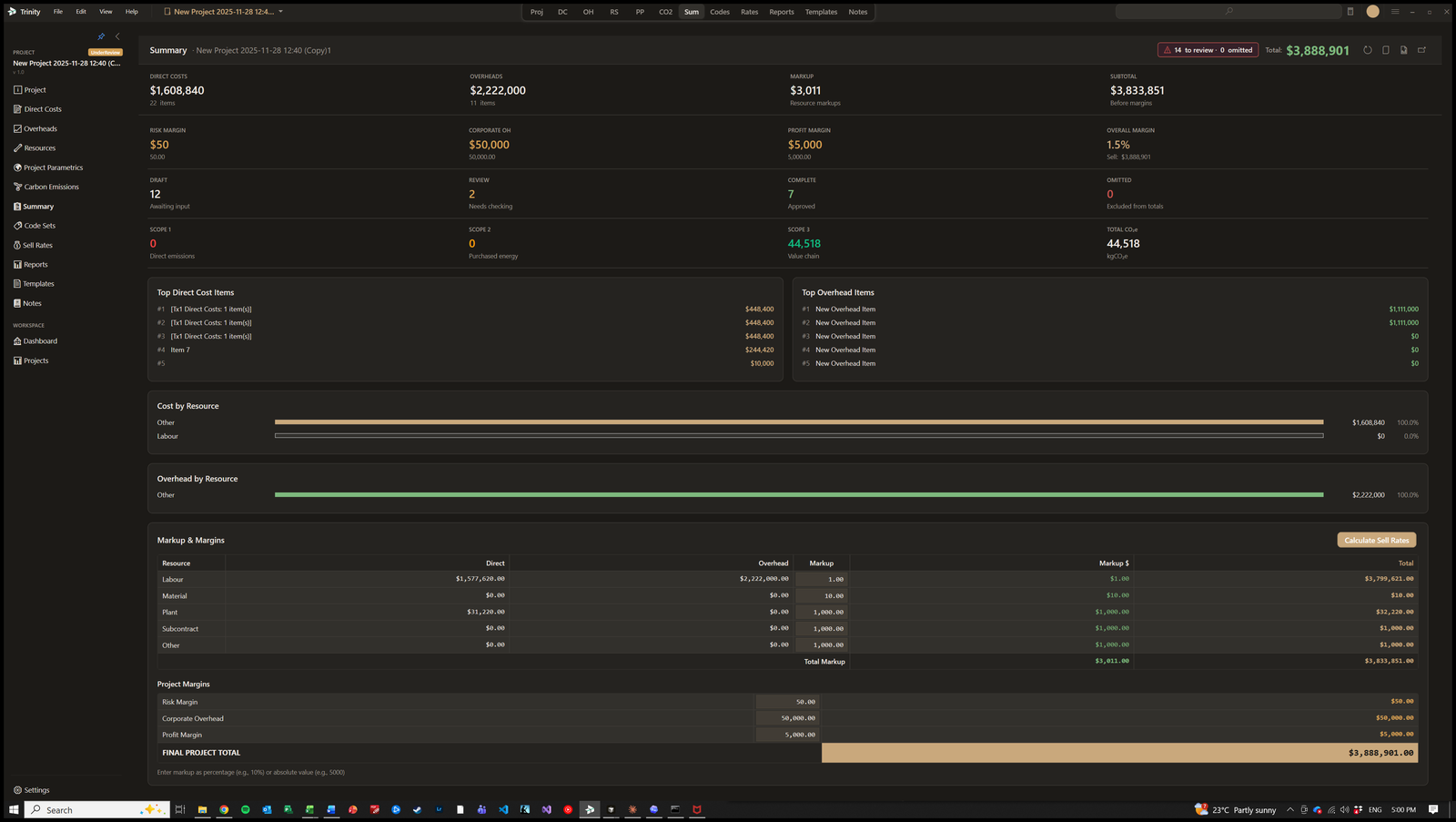
TX1:Trinity project summary showing cost totals, top items, margins and resource breakdown

One pipeline from direct cost to sell price

  • Direct costs plus overheads give total cost; markup is applied per resource type, not as one blanket percentage
  • Risk, corporate and profit margins are separate lines, so a commercial conversation can move one without disturbing the others
  • Apportioned overhead lands on the item it belongs to: CalculatedSellRate = DirectRate + (TotalAllocated / Qty)
  • The path from a resource rate to a tendered sell rate stays inspectable at every step

Under the bonnet

The parts that decide whether an estimate survives its own revisions

Parallel code sets

  • Several classification trees over the same estimate at once
  • Work breakdown structure, AS 2124 schedules and a client chart of accounts, side by side
  • Percentage-split allocations where an item genuinely belongs to more than one code
  • Report against whichever structure the reader asked for, without rebuilding the estimate

Portable .tx1 packages

  • A single compressed file carrying a project, or a whole library
  • Optional AES-256 encryption for when the package leaves your network
  • Checksum validation on import, so a truncated transfer fails loudly rather than quietly
  • The unit of exchange when a library moves between machines or estimators

Local-first by design

  • A WPF/.NET Windows desktop application, not a browser tab pretending to be one
  • EF Core over SQLite — the estimate is a file on your disk
  • Works on a laptop in a site office with no connection and no degraded mode
  • Commercially sensitive rates do not leave the machine unless you send them

Proven at library scale

  • Our in-house Transport and Main Roads library runs to 1,852 priced items
  • That library ships as a single package, TMR_MASTER.tx1, at 19.2 MB
  • Dependency tracking is what makes a library that size maintainable rather than archaeological
  • A rate change propagates through the library instead of being re-keyed item by item

How TX1:Trinity works

The same four moves an experienced estimator already makes, recorded so they can be checked

1

Set the resources

Bring in labour, plant, material and subcontract resources with their base rates and factors, or import a library you already hold as a .tx1 package.

2

Build the items

Price each item from its crew, its production rate and its quantities. Formulas carry the reasoning, so the next reader can see why the rate is what it is.

3

Apply overheads and margin

Apportion overheads, set markup by resource type, then add risk, corporate and profit margins as separate, arguable lines.

4

Report and package

Report against any code set you have defined, snapshot the carbon position, and hand the whole thing over as one portable package.

More tools at your fingertips

Project templates

Start from a structure that already works

Code sets and WBS

Several classification trees, one estimate

Carbon snapshots

A verified position you can reproduce

Local database

Your rates stay on your machine

See TX1:Trinity in action

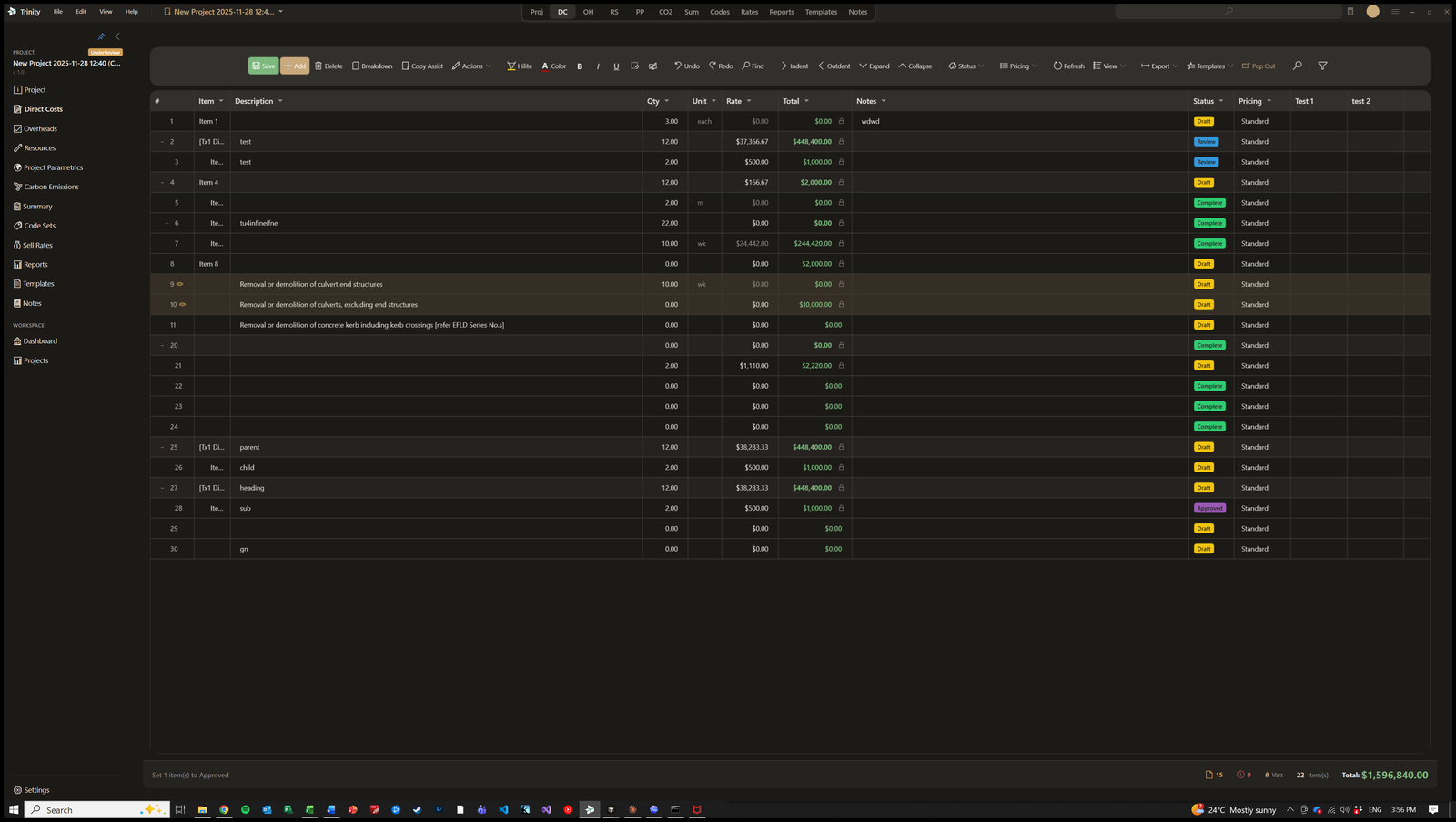
TX1:Trinity direct costs view with line items, quantities, rates and status indicators
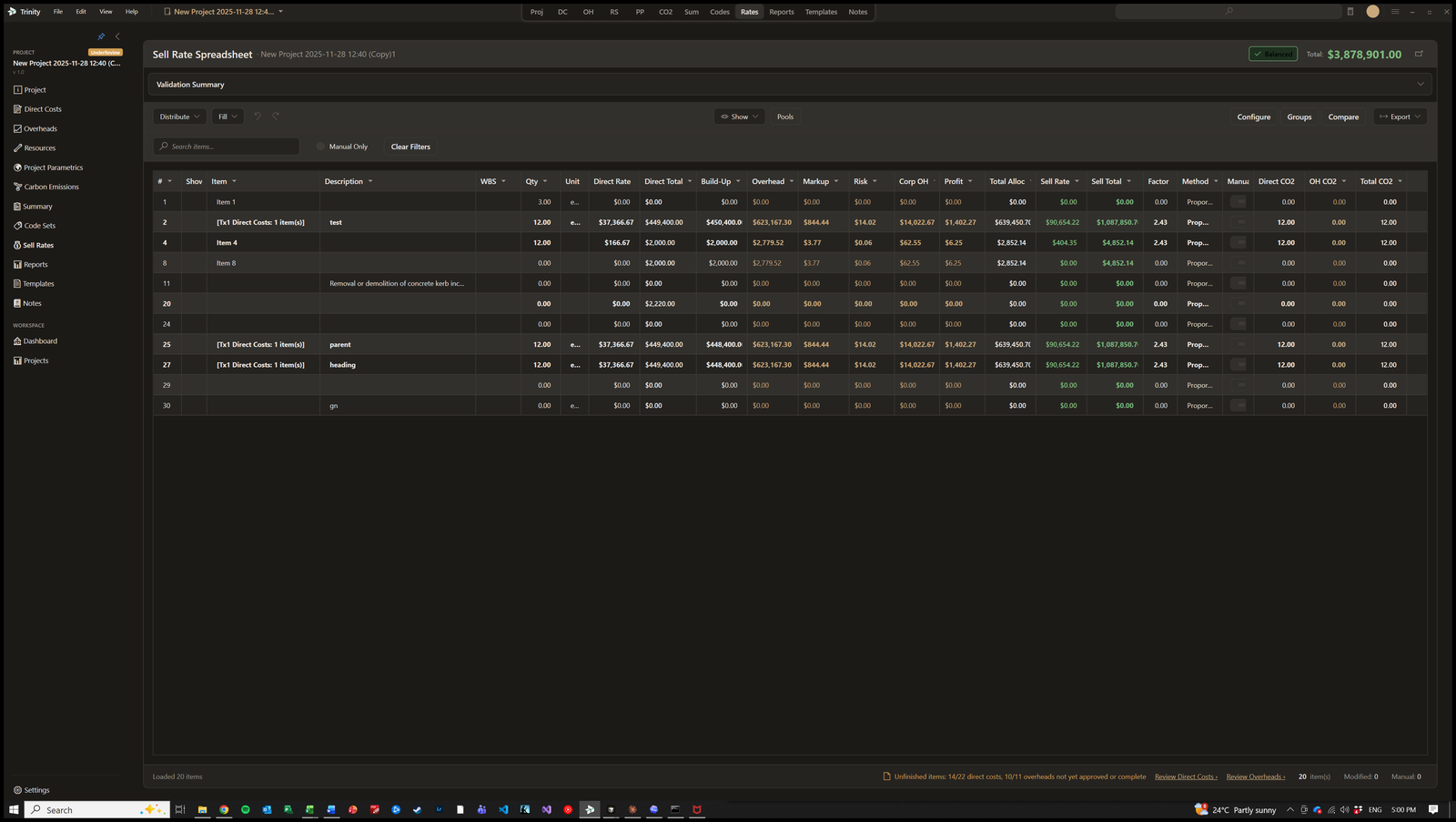
TX1:Trinity sell rate spreadsheet showing rate validation across a project
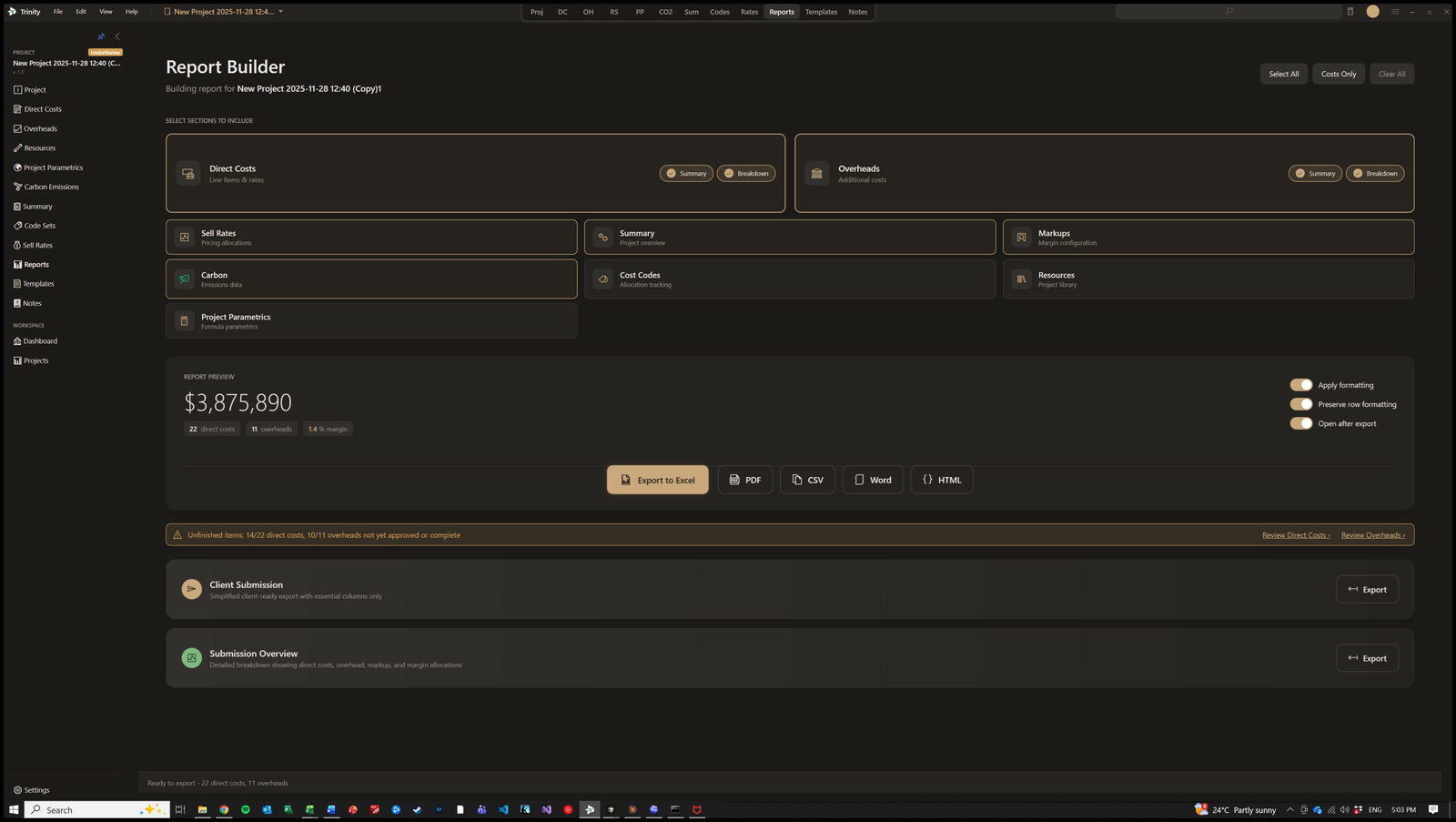
TX1:Trinity report builder with section toggles and export options
TX1:Trinity project summary with KPIs, top cost items, margins and resource breakdown
The method, not the marketing

Estimating software is an opinion about how estimating should be done

Every tool in this category encodes a view of the work. Ours is that a rate you cannot take apart is a rate you cannot defend, and that the arithmetic belongs inside the estimate rather than inside somebody's head. We have written that view down in full.

The estimating guide runs to nine chapters on how first-principles estimates are actually built in Australian construction and infrastructure: what an estimate is made of, how estimate classes govern what accuracy you are entitled to claim, where P50 and P90 come from, what measurement rules do to a quantity, and what it takes to build a rate library that survives its second year. Read it whether or not you ever install the software.

Licensing

Per user, per month, billed in Australian dollars. Three tiers, from a single estimator through to a multi-office contractor.

Try it before you talk to anyone. The trial runs for 14 days with no credit card, and it is the full desktop application rather than a limited demonstration — install it, build a real item, and judge the rate it produces.

Want a rate you can defend line by line?

Install TX1:Trinity, price one item whose answer you already know, and see whether the build-up tells you something your spreadsheet did not.

— Documentation

TX1:Trinity User Guide

Every screen, every formula, every workflow, documented section by section — cost build-ups, resources, markup and sell rates, the formula engine and carbon accounting. Full-text search included, and free to read before you install anything.

Open the User Guide